How a doll gets built
Every doll has a build script that rebuilds her exactly: from the sprite pieces to the finished PNG, the layered Aseprite file, and her real height. Here's what each step does, with the real code.
The EasyDoll pieces aren't mine to post, so you won't see a bare body, a gown or a head on its own anywhere here. Every picture is a finished doll, an accessory drawn from scratch, or a diagram drawn over a finished doll. The snippets are excerpts from the private build repo as of Nov 4, 2026.
- The pieces
- Skin ramps
- The neck join
- Painting gowns
- Original accessories
- Layers and the flatten check
- Height
- Group shots
1. The pieces
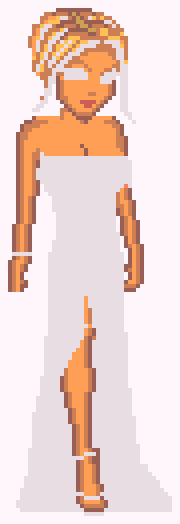
A doll starts as two sprites from Eve's EasyDoll dollmakers: a gown, which is a whole body wearing a dress, and a head. Their names come from the maker folders. Lisa Vanderpump is the gown uniqueprops/ud14 under the head uniqueprops/uh29.
The sets were drawn by different people for different makers, so their scales, faces and skin palettes don't always agree. Matching them is most of the work.
Each doll has a shell script, <slug>.sh, that runs her whole build, and most also have a Python painter for the gown. They need ImageMagick 7 and Python 3. The shared helpers live in pix.py, and the first one turns any image into a plain grid of pixels:
def load(path):
    src = path if path.endswith("]") else f"{path}[0]"
    out = subprocess.run(["magick", src, "-depth", "8", "txt:-"], check=True, capture_output=True, text=True).stdout
    lines = out.splitlines()
    w, h = (int(v) for v in lines[0].split(":")[1].split(",")[0:2])
    grid = [[(0, 0, 0, 0)] * w for _ in range(h)]
    for line in lines[1:]:
        coords, rest = line.split(":", 1)
        x, y = (int(v) for v in coords.split(","))
        hexes = rest.split("#")[1].split()[0]
        r, g, b = (int(hexes[i:i + 2], 16) for i in (0, 2, 4))
        a = int(hexes[6:8], 16) if len(hexes) >= 8 else 255
        grid[y][x] = (r, g, b, a)
    return grid
ImageMagick prints every pixel as text, and load reads it back into a list of rows of (r, g, b, a) tuples. Everything after this is list surgery on that grid.
2. Skin: palette swaps and ramps
Classic dollz share one skin palette: eight tan shades, from highlight to shadow. Every piece uses the same eight colors, so changing a doll's skin is a color swap, not a repaint.
The stock tan is about twice as saturated as any real skin in the reunion photos, so most dolls swap to another ramp. Each ramp keeps eight steps in the same order, so the shading lands where the artist put it.
| Ramp | Eight steps | Worn by |
|---|---|---|
| tan (stock) | Whitney, Lisa Barlow | |
| fair | Kim, Lisa Vanderpump, Eileen, Bethenny, Sonja | |
| golden | Erika, LuAnn, Ramona, Andy | |
| light-bronze | Kyle | |
| bronze | Alexia, Tamra, Teresa | |
| caramel | Gizelle | |
| brown | Nobody right now | |
| chestnut | Kandi | |
| deep | NeNe |
Mary Cosby keeps her head's own lighter brown, carried down to her arms, so she isn't on this list.
TONES = {
    "tan": ("FFBF55", "FF9F55", "FF7F55", "CC9F55", "CC7F55", "CC5F55", "997F55", "995F55"),
    "fair": ("FFE6D2", "F9D0B4", "F0BC9C", "E5B597", "D7A083", "C58C70", "B08468", "96705A"),
    "golden": ("FBD9A8", "EDB98A", "E2A577", "D69F74", "C98E63", "B87A52", "A26E4C", "8A5A3C"),
    "light-bronze": ("FFCB7B", "F8AB6D", "F39164", "D19F63", "CB865B", "C36C54", "9D7751", "925D4A"),
    "bronze": ("FFC76F", "FAA765", "F78B5F", "CF9F5F", "CB8459", "C66854", "9C7A52", "955E4E"),
    "caramel": ("ECB474", "DA925D", "D07C53", "B88453", "AD704A", "A25B42", "856041", "784A39"),
    "brown": ("D9A27A", "B97E55", "AA6E47", "A06A47", "8F5B3A", "7E4E31", "6E4530", "5A3624"),
    "chestnut": ("C08A62", "A26A42", "945C3A", "8A5838", "794A2E", "6A3F26", "5E3A26", "4C2D1D"),
    "deep": ("A8714A", "8A5530", "7E4A2C", "74462A", "633A22", "55301C", "4E2E1B", "3E2416"),
}
STOCK = {str(i + 1): rgb(c) for i, c in enumerate(TONES["tan"])}


def retone(grid, tone, box=None, only=None):
    swap = {t: rgb(c) for t, c in zip(TONES["tan"], TONES[tone]) if only is None or t in only}
    for y, row in enumerate(grid):
        for x, px in enumerate(row):
            if px[3] >= 128 and hexof(px) in swap and (box is None or box[0] <= x <= box[2] and box[1] <= y <= box[3]):
                row[x] = swap[hexof(px)]
    return grid
retone maps stock tan to the new ramp one color at a time. box limits the swap to a rectangle, and only limits it to some of the eight colors.
The trap: hair in the skin colors
Some heads draw their hair in the same eight colors. Swap the whole head and the hair turns into skin.
Here's Whitney with everything that isn't stock tan grayed out. A lot of her blonde is skin palette, and so is a spot at her crown that was painted to match.
So those heads get a box. Tamra's swap touches two rectangles around her face and leaves her hair alone:
# uh42's hair is drawn in the skin palette, so only its face is retoned.
python3 -I -c "import sys; sys.path.insert(0, sys.argv[1]); from pix import load, save, retone; g = load(sys.argv[2]); retone(g, sys.argv[4], box=(12, 12, 25, 17)); retone(g, sys.argv[4], box=(10, 18, 25, 29)); save(g, sys.argv[3])" \
Lisa Vanderpump's head reuses two skin colors in its hair, so her build swaps the colors by hand and darkens those two with the hair instead:
# uh29's hair uses #997F55 and #CC9F55 from the skin palette, so those two are darkened with the hair, not swapped to fair.
magick "$W/lvp-head-tan.png" -fill '#FFE6D2' -opaque '#FFBF55' -fill '#F9D0B4' -opaque '#FF9F55' -fill '#F0BC9C' -opaque '#FF7F55' \
  -fill '#D7A083' -opaque '#CC7F55' -fill '#C58C70' -opaque '#CC5F55' -fill '#96705A' -opaque '#995F55' \
  -fill '#7A4026' -opaque '#995F00' -fill '#9A5E40' -opaque '#997F55' -fill '#B07A55' -opaque '#CC9F55' -fill '#A8505E' -opaque '#660000' "PNG32:$W/lvp-head.png"
Checked against the photo
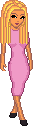
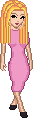
Ramps are picked by comparing the doll with her reunion photo, and the photos stay private. Kyle went through three: stock tan read too orange next to Kim, golden read ashy, and light bronze stuck. Kim went from stock tan to fair.
3. The neck join
The head and the gown come from different makers, so nothing says where one sits on the other. neckjoin.sh finds the spot by looking for skin.
#!/bin/bash
# Hair or streaks in the skin's base color fool the chin search: pass an x nudge or place the head by hand.
set -euo pipefail
G="$1"; H="$2"; ov="$3"; out="$4"; nudge="${5:-0}"
mk=${MARK:-FF9F55}; skin="(u.a>0.5 && abs(u.r-0x${mk:0:2}/255)<0.01 && abs(u.g-0x${mk:2:2}/255)<0.01 && abs(u.b-0x${mk:4:2}/255)<0.01) ? 1 : 0"
gy=$(magick "${G}[0]" -alpha on -fx "$skin" -trim -format '%[fx:page.y]' info:)
gx=$(magick "${G}[0]" -alpha on -fx "$skin" -crop "x1+0+${gy}" +repage -trim -format '%[fx:page.x+w/2]' info:)
hb=$(magick "${H}[0]" -alpha on -fx "$skin" -trim -format '%[fx:page.y+h-1]' info:)
hx=$(magick "${H}[0]" -alpha on -fx "$skin" -crop "x1+0+${hb}" +repage -trim -format '%[fx:page.x+w/2]' info:)
read -r gw gh < <(magick identify -format '%w %h\n' "${G}[0]")
read -r hw hh < <(magick identify -format '%w %h\n' "${H}[0]")
dx=$(awk -v a="$gx" -v b="$hx" -v n="$nudge" 'BEGIN{print int(a-b+n+0.5)}')
top=$((hb + 1 - ov - gy))
oy=0; (( top < 0 )) && oy=$((-top))
ox=0; (( dx < 0 )) && ox=$((-dx))
W=$((gw + ox)); (( dx + ox + hw > W )) && W=$((dx + ox + hw))
Hh=$((gh + top + oy)); (( hh + oy > Hh )) && Hh=$((hh + oy))
if [ -n "${NOTRIM:-}" ]; then finish=(+repage); else finish=(-trim +repage); fi
magick -size "${W}x${Hh}" xc:none "${G}[0]" -geometry "+${ox}+$((top + oy))" -composite \
  "${H}[0]" -geometry "+$((dx + ox))+${oy}" -composite "${finish[@]}" "PNG32:$out"
[ -n "${NOTRIM:-}" ] && echo "canvas ${W}x${Hh} gown +${ox}+$((top + oy)) head +$((dx + ox))+${oy}" || true- On the gown, find the top row that has the skin's base color,
#FF9F55. That's the top of the neck. Take the middle of that row. - On the head, find the bottom row with that color. That's the chin. Take its middle.
- Line the two middles up, plus any nudge, and lower the head until the chin overlaps the neck by
ovrows, usually 2. - Grow the canvas to fit both, paste the gown, then paste the head over it.
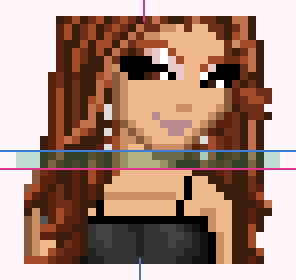
- bottom of the chin
- top of the neck
- the 2 overlapping rows
When the hair fools it
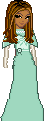
Hair drawn in the skin's base color fools the chin search, which is what the script's one comment warns about. Mary Cosby's hair streaks use the base color, so her first join put her head about 10 px right of her neck.
Her build nudges it back, and lowers her head 4 px so her high collar doesn't read as a long neck.
4. Painting gowns
Most gowns need more than a recolor: a strap painted out, sleeves painted on, a slit moved, a hem dropped. The painters work in two ways.
Rules for the cloth
Lisa Vanderpump's gown starts as the same black strappy slip as Kim's. Her painter decides, for every pixel, whether it's cloth, then shades it from its neighbors: an outline where it touches empty space, a deep shade where it touches skin, a two-pixel shade along each edge of a row, and a three-color pattern on the cuffs.
painted = set()
for y in range(h):
    for x in range(w):
        if not opaque(x, y) or in_v(x, y):
            continue
        if 2 <= y <= SLEEVE_END and hexof(g[y][x]) not in DRESS or 2 <= y <= 12 or 56 <= y <= HEM:
            painted.add((x, y))
kept = {(x, y) for y in range(56) for x in range(w) if opaque(x, y) and hexof(g[y][x]) in DRESS} - painted
cloth = painted | kept

for x, y in kept:
    out[y][x] = DRESS[hexof(g[y][x])]
for x, y in painted:
    lo = hi = x
    while (lo - 1, y) in cloth:
        lo -= 1
    while (hi + 1, y) in cloth:
        hi += 1
    if any(not opaque(*n) for n in edges(x, y)):
        out[y][x] = OUTLINE
    elif any(n not in cloth for n in edges(x, y)):
        out[y][x] = DEEP
    elif 34 <= y <= SLEEVE_END and (x <= 8 or x >= 26):
        out[y][x] = CUFF[(x + 2 * y) % 3]
    else:
        out[y][x] = SHADE if x - lo <= 1 or hi - x <= 1 else BASE
No pixel is placed by hand here. Move the hem with HEM= and the whole gown re-shades to match.
Stamps for the details
Small details are easier to draw than to describe. stamp takes rows of characters and a key. A . leaves the pixel alone, a - erases it, a digit is one of the stock skin colors, and any other letter is looked up in the ink.
def stamp(grid, x0, y0, rows, ink):
    for j, line in enumerate(rows):
        for i, ch in enumerate(line):
            if ch == "-":
                grid[y0 + j][x0 + i] = (0, 0, 0, 0)
            elif ch != ".":
                grid[y0 + j][x0 + i] = ink[ch] if ch in ink else STOCK[ch]
    return grid
Sonja's jeweled bib is one stamp, drawn as text in her painter. G, Y and O are three golds, and S, W and K are three silvers:
....W.K.W.S.W....
....W.K.W.S.W....
....S.W.K.W.S....
OYGSWSGYGSWSGYGSO
.OGYWSYGYSWYGYGO.
..OSWGYWYGWSGWO..
...OYGSWSWSGYO...
....OGYWYWYGO....
.....OSWGWSO.....
......OYGYO......
.......OWO.......
........O........

Repaints
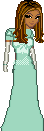
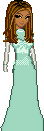
Mary's arms read as stiff gray poles, and her bodice had no waist. The repaint added mint cape sleeves, warmed the gloves from gray to ivory, made the lace band at her hips plain, and tied a sash at her waist.
NeNe's Grecian gown is drawn from scratch over the body: a halter V, a gold collar, an empire band and pleats to the floor. Her forearm was later reconnected at the elbow.


5. Original accessories
Every doll gets an accessory she wore at her reunion, drawn from scratch, with no EasyDoll pixels at all. Most are a few pixels each, so they're written as data: lists of (x, y, color) points, built from small helpers for drops, hoops and bands.
GOLD_HI, GOLD, GOLD_MID, GOLD_DK = "F2D27A", "E0B040", "C9A04A", "9C7A3A"
DIA_HI, DIA, DIA_MID, DIA_DK = "FFFFFF", "F2F4FA", "C9CDD8", "9EA3B0"
JET = "2E2833"


def drop(x, y, colors):
    return [(x, y + i, c) for i, c in enumerate(colors)]


def hoop(cx, cy):
    return [(cx, cy - 1, GOLD_HI), (cx - 1, cy, GOLD), (cx + 1, cy, GOLD), (cx, cy + 1, GOLD_DK)]


def band(y, x0, colors):
    return [(x0 + i, y, c) for i, c in enumerate(colors)]


SHORT_GOLD = [GOLD_HI, GOLD, GOLD, GOLD_DK]
LONG_GOLD = [GOLD_HI, GOLD, GOLD, GOLD_MID, GOLD_DK]
DIAMOND_DROP = [DIA_MID, DIA, DIA_HI, DIA, DIA_MID]
STATEMENT = [DIA_MID, DIA_HI, DIA_HI, DIA, DIA_DK]
TENNIS = [DIA, DIA_MID, DIA_HI, DIA_MID, DIA]

ACCESSORIES = {
    "kyle-s12": ("gold hoop earrings", hoop(10, 24) + hoop(27, 24)),
    "kim-richards-s5": ("gold drop earrings", drop(9, 22, SHORT_GOLD) + drop(24, 22, SHORT_GOLD)),
    "eileen-s6": ("jeweled cuff", band(61, 7, [DIA, JET, DIA_MID, JET]) + band(62, 6, [JET, DIA_MID, JET, DIA])),
    "bethenny-s10": ("diamond drop earrings", drop(44, 22, DIAMOND_DROP) + drop(55, 22, DIAMOND_DROP)),
...
The build paints the points onto their own transparent layer, saves that layer as its own sprite, and flattens it onto the doll:
    acc = [[(0, 0, 0, 0)] * w for _ in range(h)]
    for x, y, c in pixels:
        acc[y][x] = rgb(c)
    os.makedirs(PIECES, exist_ok=True)
    acc_png = os.path.join(W, f"{slug}-accessory.png")
    save(acc, acc_png)
    subprocess.run(["magick", acc_png, "-trim", "+repage", f"PNG32:{os.path.join(PIECES, slug + '-' + name.replace(' ', '-') + '-original.png')}"], check=True)
    out = [[acc[y][x] if acc[y][x][3] else base[y][x] for x in range(w)] for y in range(h)]
    save(out, png)
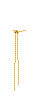
Bigger pieces, like Sonja's bib, LuAnn's rope belt and Andy's trousers, are drawn in their own painters. Here they all are, enlarged:




6. Layers and the flatten check
The flat PNG is what goes into the group shots, but every doll is also a layered Aseprite file, so the pieces can be redrawn one at a time. The build writes a Lua script that rebuilds the doll in Aseprite, one layer per piece at the same offsets. Then it exports the file back to a PNG and compares it with the flat one.
ASE=~/"Library/Application Support/Steam/steamapps/common/Aseprite/Aseprite.app/Contents/MacOS/aseprite"
cat > "$W/lvp.lua" <<LUA
local spr = Sprite($tw, $th, ColorMode.RGB)
local l = spr.layers[1]
l.name = "gown uniqueprops/ud14 (plum, long sleeves, jeweled cuffs, sheer V, midi hem, silver pumps)"
spr:newCel(l, 1, Image{ fromFile = "$W/lvp-gown.png" }, Point($((gx - tx)), $((gy - ty))))
l = spr:newLayer(); l.name = "head uniqueprops/uh29 (hair darkened to auburn brown, pink lips, fair skin)"
spr:newCel(l, 1, Image{ fromFile = "$W/lvp-head.png" }, Point($((hx - tx)), $((hy - ty))))
l = spr:newLayer(); l.name = "pink drop earrings (original)"
spr:newCel(l, 1, Image{ fromFile = "$W/lvp-earrings.png" }, Point($((ex - tx)), $((ey - ty))))
l = spr:newLayer(); l.name = "Siena draws here"
spr:saveAs("$H/lvp-s5.aseprite")
LUA
"$ASE" -b --script "$W/lvp.lua"
"$ASE" -b "$H/lvp-s5.aseprite" --save-as "$W/lvp-check.png"
echo "lvp-s5: $tw x $th, differing pixels: $(magick compare -metric AE "$H/lvp-s5.png" "$W/lvp-check.png" null: 2>&1)"
magick compare -metric AE counts the pixels that differ, and the answer has to be 0. If the layers and the flat PNG ever disagree, the build says so on the spot.
- head
- gown
- original
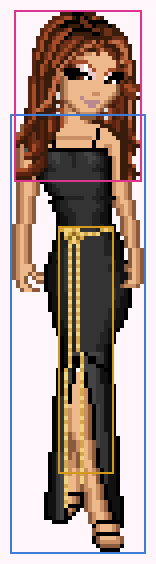
LuAnn's layers, top to bottom, as Aseprite lists them. The names say where each piece came from and what changed:
- Siena draws here
- head uniqueprops2/uh9 (highlights warmed to auburn, golden skin)
- beaded rope belt (original)
- gown uniquepromprops/ub8 (shoulder drape painted out, two spaghetti straps, golden skin)
The top layer is always empty and named Siena draws here. That's where my own drawings go, one piece at a time, until no EasyDoll pixels are left.
7. Height: 2 px per inch
Every doll stands at her real height. The scale is anchored on Lisa Vanderpump, who says she's 5'5". Her body, from the top of her gown to the floor, is 101 px, and every inch above or below 5'5" adds or removes 2 px. A 5'5" doll is about 128 px tall, which is almost exactly 2 px per inch, so the proportions stay true.
Heads don't grow with height, so the head, face, hair and bodice stay as drawn. The changed rows are spread evenly through the band from 55% to 85% of the way down the body, which is the lower skirt. Heels aren't counted.
PX_PER_INCH, REF_INCHES, REF_BODY = 2, 65, 101
...
def row_map(h, top, inches):
    body = h - top
    delta = int((inches - REF_INCHES) * PX_PER_INCH + (0.5 if inches >= REF_INCHES else -0.5))
    change = REF_BODY + delta - body
    lo, hi = top + int(body * 0.55), top + int(body * 0.85)
    n = abs(change)
    picks = {lo + (2 * k + 1) * (hi - lo) // (2 * n) for k in range(n)} if n else set()
    rows = []
    for y in range(h):
        if change < 0 and y in picks:
            continue
        rows.append(y)
        if change > 0 and y in picks:
            rows.append(y)
return rows, body, delta- the band where rows change
- copied rows (taller)
- where rows were dropped (shorter)
The same row list is replayed on every layer of the Aseprite file, and the flatten check runs again:
local w, h = spr.width, #map
local out = {}
for _, layer in ipairs(spr.layers) do
  local cel = layer:cel(1)
  if cel then
    local src, pos = cel.image, cel.position
    local img = Image(w, h, ColorMode.RGB)
    for yo = 0, h - 1 do
      local ys = map[yo + 1] - pos.y
      if ys >= 0 and ys < src.height then
        for xs = 0, src.width - 1 do
          local x = xs + pos.x
          if x >= 0 and x < w then img:drawPixel(x, yo, src:getPixel(xs, ys)) end
        end
      end
    end
    out[#out + 1] = {layer, img}
  end
end
The shortest doll, Kim at 5'1", lost 8 px. The tallest, NeNe at 5'10½", gained 11. The sources behind those numbers vary a lot, so the sources page grades every one.
8. Group shots
A group shot stands every doll on one floor line. Packing them by their bounding boxes leaves big gaps, because gowns flare and arms stick out. So final-shot.py packs by outline instead.
FACES_LEFT = {"andy"}
FLOOR, MARGIN, STRIP, SET_W = 152, 14, 26, 221
RISER = int(os.environ.get("RISER", "32"))
PACK_FROM = float(os.environ.get("PACK_FROM", "0.45"))
SET = os.environ.get("SET", "mashup")
DISK = [(dx, dy) for dx in range(-2, 3) for dy in range(-2, 3) if dx * dx + dy * dy <= 4]
...
def pack(slugs, tag):
    dolls, taken, x = [], set(), 0
    for i, (s, nudge) in enumerate(slugs):
        g = load(os.path.join(H, f"{FILES[s]}.png"))
        flipped = (i >= (len(slugs) + 1) // 2) != (s in FACES_LEFT)
        if flipped:
            g = [row[::-1] for row in g]
        h, w = len(g), len(g[0])
        cells = {(cx, cy - h) for cy in range(int(h * PACK_FROM)) for cx in range(w)
                 if all(0 <= cx + dx < w and 0 <= cy + dy < h and g[cy + dy][cx + dx][3] >= 128 for dx, dy in DISK)}
        if i:
            x = dolls[-1]["x"] + 1
            while any((cx + x, cy) in taken for cx, cy in cells):
                x += 1
        x += nudge
        taken |= {(cx + x, cy) for cx, cy in cells}
        path = os.path.join(W_DIR, f"{name}-{tag}-{FILES[s]}.png")
        save(g, path)
        dolls.append({"slug": s, "grid": g, "x": x, "w": w, "h": h, "path": path, "flipped": flipped})
    names = [s for s, _ in slugs]
    center = names.index("nene") if "nene" in names else len(slugs) // 2
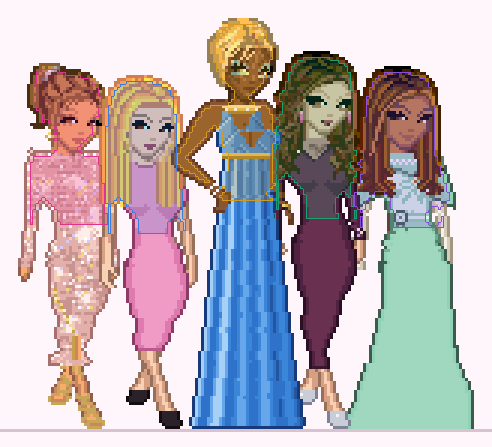
return dolls, max(d["x"] + d["w"] for d in dolls), center- Take the top 45% of each doll: head, shoulders and arms.
- Shrink that shape by a 2 px disk, so outlines can overlap a little at the edges.
- Slide each doll in from the right, one pixel at a time, until her shrunken shape clears everyone already placed. Skirts are free to overlap below.
- Mirror every doll past the middle of the row, so both halves face in. Andy is drawn facing left already, so his rule runs the other way.
Then the dolls are drawn from both ends toward the center, so the center doll stands in front of her neighbors:
for i in list(range(center)) + list(range(len(dolls) - 1, center, -1)) + [center]: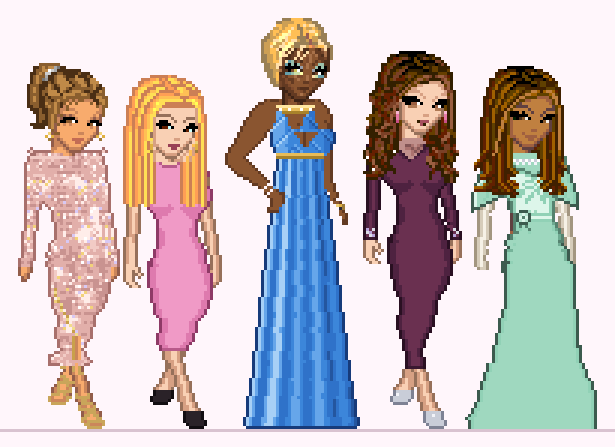
The sets
Every franchise has its own original set: its city at dusk behind the couch, and its icon on the rug. Beverly Hills gets hillside houses and diamonds. Orange County gets an ocean sunset with a pier, and oranges. Salt Lake City gets snowy peaks and snowflakes, and Atlanta a skyline with peach trees and peaches. Miami gets pastel towers and flamingos, and Potomac the Washington Monument behind cherry blossoms. New Jersey is a rose garden estate, and New York a skyline with a red couch and apples.
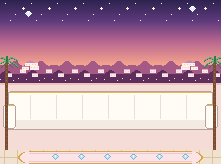
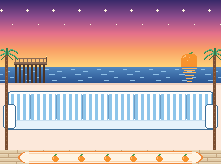
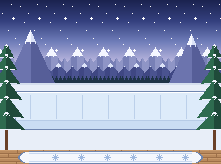
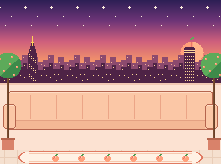
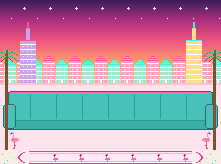
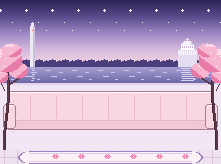
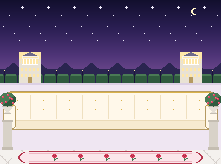
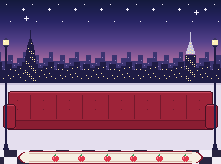
Franchises with at least two dollz get a group shot on their own set. Miami, Orange County, New Jersey and Potomac have one doll each so far, so their sets are waiting.
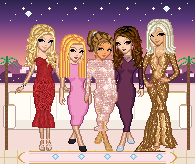
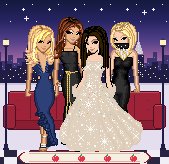
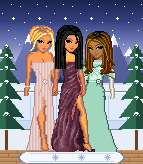
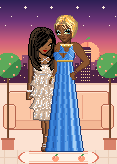
The mixed shots stand on a mash-up of all eight cities, west to east.
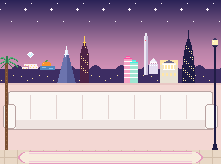
Every set is 221 px wide. When a row needs more room, the script repeats whole 26 px strips at the spots each set lists, so the skyline and the couch just get longer. The mash-up lists a spot in each city, so the extra width gets shared around.
 "beverly-hills": {"file": "bg-set-beverly-hills-221.png", "split": 91, "cut": 95, "trim": [43, 178], "spots": [108]},
...
"mashup": {"file": "bg-set-mashup-221.png", "split": 91, "cut": 95, "trim": [90, 124], "spots": [40, 57, 78, 95, 124, 144, 160, 181]} spots, strips = sorted(meta["spots"]), d // STRIP
count = dict.fromkeys(spots, strips // len(spots))
extra = strips % len(spots)
for i in range(extra):
count[spots[round((i + 0.5) * len(spots) / extra - 0.5)]] += 1
cut = meta["cut"]
out = []
for row in ref:
strip, line, prev = row[cut:cut + STRIP], [], 0
for p in spots:
k = (p - cut) % STRIP
line += row[prev:p] + (strip[k:] + strip[:k]) * count[p]
prev = p
out.append(line + row[prev:])
return outneed = max((2 * max(mid(d, c), w - mid(d, c)) if back else w) for (d, w, c), _, _ in rows) + 2 * MARGIN
strips = max(0, -(-(need - SET_W) // STRIP))
width, height = SET_W + STRIP * strips, 164 + (RISER if back else 0)
bg = background(SET, width)
pad = height - len(bg)
bg = [bg[0][:] for _ in range(pad)] + bg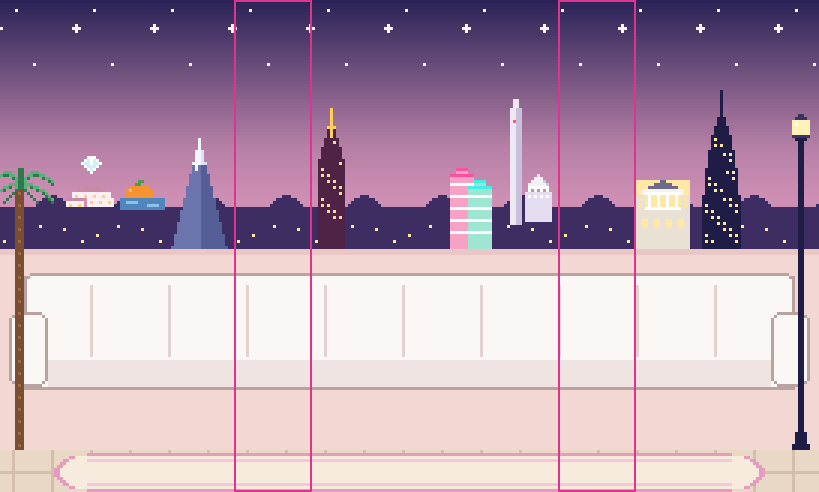
Collisions
Every real change rippled through the shot. At real heights, NeNe's head covered Bethenny's face in the back row, so LuAnn moved behind NeNe. Then Andy pushed NeNe off center, and later stood in front of Tamra, so he moved to the right end of the front row.
Who stands where
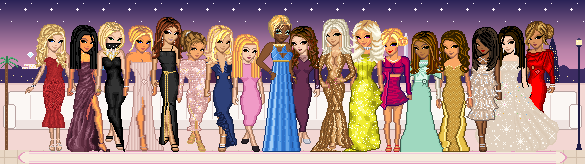
The back row only shows from the shoulders up, so the front row gets the looks whose detail is below the waist: Bethenny's star ball gown, Erika's train, Teresa's satin panels and Alexia's sequin skirt. The back row gets the looks that read from the shoulders up, like Sonja's bib and mask and Ramona's deep V.
The back row stands on a 32 px riser, behind the couch. Once they're drawn, the set gets pasted back over them from the couch's top row down, so their legs disappear behind it instead of resting on the seat. The couch is its own layer in the Aseprite file, so the flatten check still comes out at 0.
    if label == "back row":
        split = split_row(SET) + pad
        for y in range(split, height):
            canvas[y] = bg[y][:]
        couch_path = os.path.join(W_DIR, f"{name}-couch.png")
        save(bg[split:], couch_path)
        layers.append(("couch and stage, in front of the back row", couch_path, 0, split))
The back row's order came from trying all 40,320 orders with LuAnn fixed behind NeNe. With the riser at 32 px, at least 95% of every face shows.
What the tests don't catch
The build scripts rebuild every doll exactly, and the flatten check proves the layers match. Neither one says the doll is right.
Much of what makes them right lives in hard-coded numbers, like a face box or a 10 px nudge, and in my eye. The calls that mattered most were about taste and accuracy, not code. The Prep bodies were far too muscular, golden skin made Kyle look ashy, and NeNe's original face was already right.